
Documentation / User guide
LoRaWAN and Sigfox
Receive uplinks from your LoRaWAN sensors through The Things Stack (TTN) or ChirpStack, and from your Sigfox devices through the Sigfox backend, with automatic device creation, a HidnSeek decoder and network location.
How it works
OpenSensorCloud is not a network server: your LoRaWAN server or the Sigfox backend forwards each message to it by webhook (or callback). An integration provides the URL to call and a secret, sent in the x-osc-secret header. Each message is then matched to a device by its devEUI (LoRaWAN) or its Sigfox ID.
Only owners and admins of the organization manage integrations.
1. Create the integration
- In the sidebar, click Integrations.
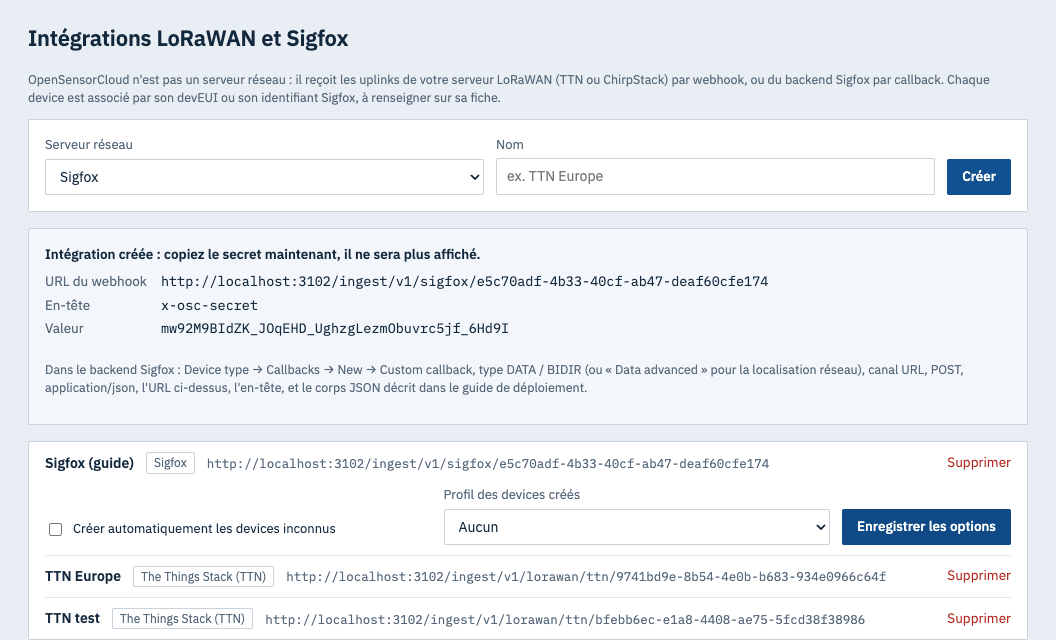
- Choose the Network server: The Things Stack (TTN), ChirpStack v4 or Sigfox, and give a Name.
- Click Create.
- Copy the Webhook URL, the Header (
x-osc-secret) and its value. The secret is shown only once.
2. Configure the network server
The Things Stack (TTN)
In the TTN console: Application → Integrations → Webhooks → Add webhook → Custom webhook. JSON format, base URL = the webhook URL, add the x-osc-secret header with the secret, and check Uplink message.
ChirpStack v4
In ChirpStack: Application → Integrations → HTTP. JSON encoding, endpoint = the webhook URL, add the header. ChirpStack adds ?event=up to each uplink; other events are ignored.
Sigfox
In the Sigfox backend: Device type → Callbacks → New → Custom callback:
- type DATA / UPLINK (or BIDIR), channel URL, method POST, content type
application/json; - URL = the webhook URL, header
x-osc-secret= the secret; - body:
{ "device": "{device}", "time": {time}, "data": "{data}", "seqNumber": {seqNumber},
  "station": "{station}", "rssi": {rssi}, "snr": {snr}, "duplicate": {duplicate} }
For network location, add a second callback of type SERVICE / DATA_ADVANCED, with the same URL and header, and "computedLocation": {computedLocation} in the body.
3. Link the devices
LoRaWAN: on the page of each device, in Settings, enter its devEUI (LoRaWAN) (16 hexadecimal characters, hyphens and spaces accepted), choose its Profile, then Save. If the network server already provides the decoded payload (decoded_payload), it is used; otherwise frm_payload goes through the profile decoder. RSSI and SNR are kept as channels.
Sigfox, either:
- enter the Sigfox ID of each device in its Settings (1 to 8 hexadecimal characters);
- or, on the Integrations page, check Create unknown devices automatically under the Sigfox integration, choose the Profile of created devices, then Save options. A
Sigfox <ID>device is created on the first message, within the organization's device limit.

A message from an unknown device is ignored (the network server still receives a 202 response, so it does not resend it endlessly).
4. Decode the frames
A Sigfox payload (12 bytes at most) is always decoded by the profile decoder (see Profiles and decoders). For HidnSeek trackers, choose the HidnSeek GPS tracker (Sigfox, 12 bytes) template in Start from a template: it produces latitude, longitude, altitude, speed, heading, battery, satellites and event_code.
Each Sigfox message also adds the sigfox.rssi and sigfox.snr channels, and, with the DATA_ADVANCED callback, sigfox.lat, sigfox.lng and sigfox.radius (accuracy in meters).
5. Location on the map
In the profile:
- Position from the latitude / longitude channels (trackers) moves the device on each message that carries both values, unless it is older than its last position (replayed frames);
- Use the network location (Sigfox) when there is no GPS fix places on the map, with its accuracy, a device that has neither a GPS position nor an entered position: for example a stationary tracker that sends no coordinates.
6. Check
Open the device page and click Start in Live debug: each uplink is shown with its content, accepted, ignored or rejected with the reason.
Take over the callbacks of the old HidnSeek server
The old /positions/sigfox and /positions/sigfox_geoloc addresses can be redirected to the integration's …/legacy and …/legacy-geoloc routes, without reconfiguring the Sigfox backend. See the integrations reference and the deployment guide.