Documentation / User guide
MQTT for existing equipment
Connect equipment that imposes its own MQTT topics (Tasmota, Shelly, Zigbee2MQTT, industrial controllers) without reprogramming it: custom topics, topic templates that create units automatically, and a bridge from an existing broker.
Three cases
| Your situation | Solution |
|---|---|
A piece of equipment publishes on its own topics (tele/prise-salon/SENSOR) |
Custom topics on a device |
A controller publishes for several units (pv/CONTROLLER-4999/1/output_data, …/2/…) |
Topic template in a profile + a Gateway device |
| The equipment already publishes on a local broker and cannot connect elsewhere | Mosquitto bridge to OpenSensorCloud |
Only owners and admins of the organization can change MQTT topics. A reserved topic cannot overlap the topic of another device, in any organization: on conflict, the message "This topic overlaps another device's topic" is shown; choose a more specific topic.
Custom topics on a device
- Create the device (see Add a device) and note its id and token.
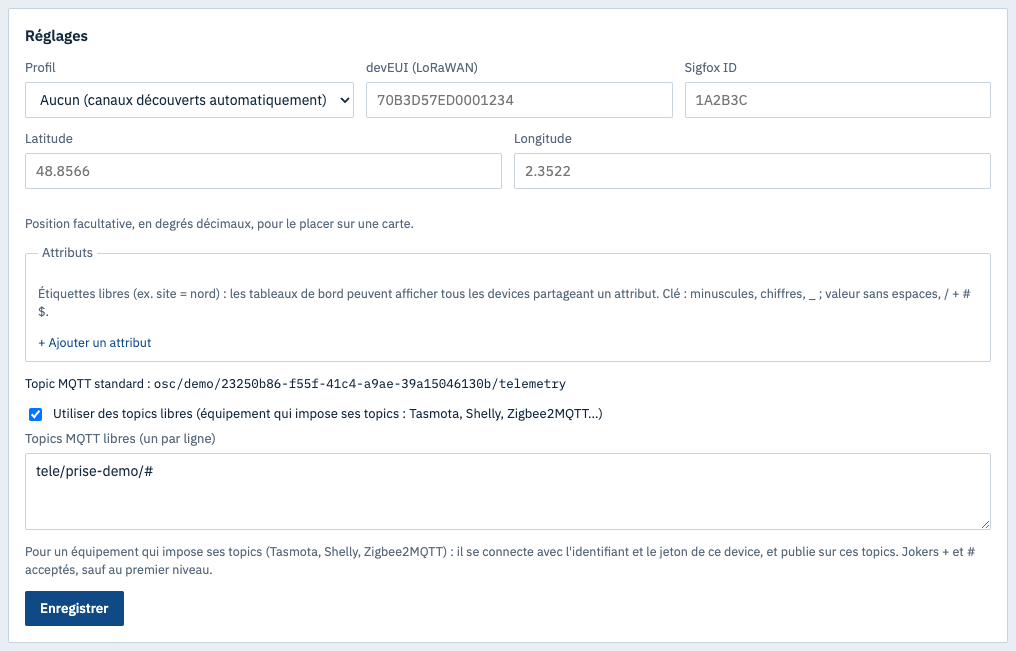
- On the device page, in Settings, check Use custom topics.
- In Custom MQTT topics (one per line), enter up to 5 filters, for example
tele/prise-salon/#. The wildcards+(one level) and#(the rest, last) are accepted, except at the first level. The$…andosc/…topics are reserved. - Click Save.
- Configure the equipment: MQTT server of the instance, username = device id, password = token. It can then publish on any topic covered by its filters.
How messages are translated:
- a standard JSON (
{"temperature": 21.4}) is accepted as is; - a single value (
45.2) becomes a channel named after the last level of the topic (…/relay/0/power→power); - any other format goes through the profile decoder, which receives the topic in
meta.topic(Tasmota template provided).
A topic change takes effect in less than a minute.
Topic template: one controller, several units
A controller publishes for several units, on topics such as pv/CONTROLLER-4999/1/output_data, pv/CONTROLLER-4999/2/output_data…
Profiles → + Profile (or Edit). In MQTT topic template (optional), enter
pv/{controller}/{unit}/output_data: each variable level is a{name}variable, the first level stays fixed. Declare the channels, then Save.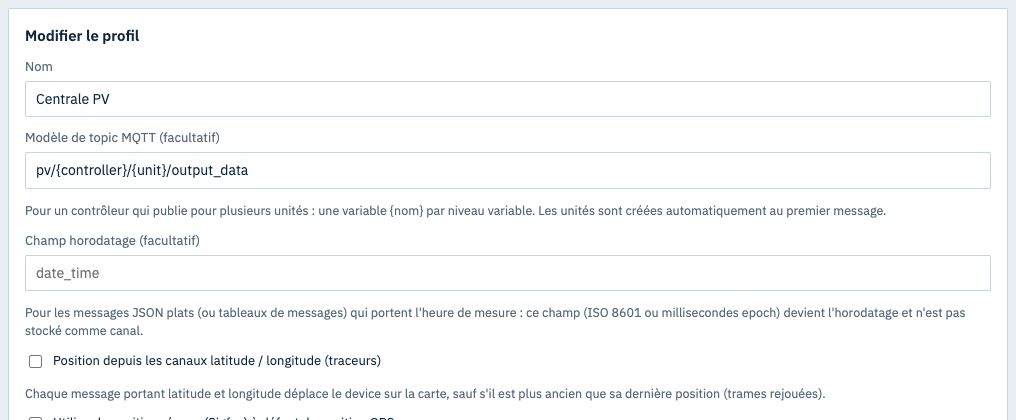
A profile with a topic template Devices → create a device of type Modbus / OPC-UA gateway (it represents the controller) and copy its token.
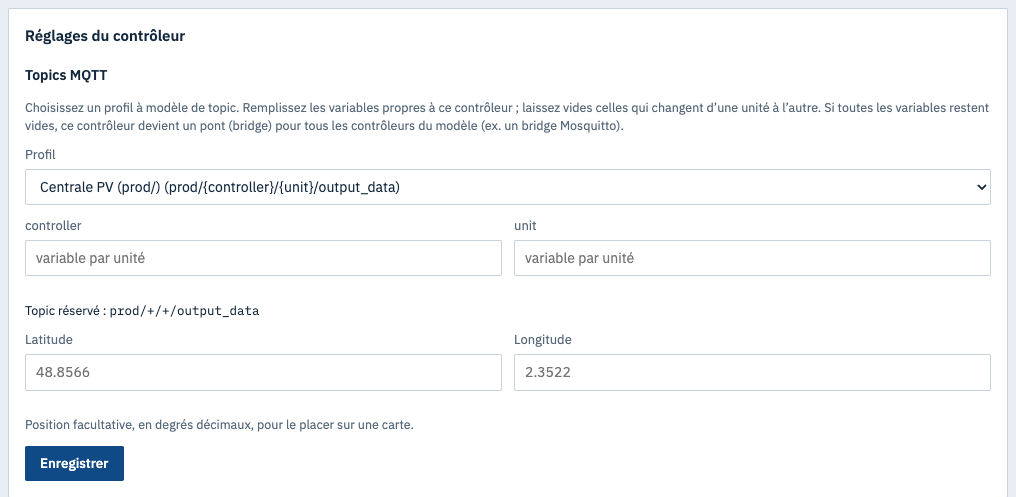
On its page, in Controller settings, choose this Profile. Fill in the variables specific to the controller (
controller=CONTROLLER-4999) and leave empty the ones that change from one unit to another (unit, marked varies per unit). The Reserved topic is shown:pv/CONTROLLER-4999/+/output_data.Click Save.
The controller connects only once, with the gateway id and token, and publishes for all its units.
On the first message of a unit, its device is created automatically (name CONTROLLER-4999 / 1, attribute unit = 1, profile of the controller), within the organization's device limit.
At least one variable must stay empty. A template used by a controller can no longer be changed.
Bridge from an existing broker
If all variables stay empty, the gateway reserves pv/+/+/output_data and becomes a bridge for all controllers of the template: each controller / unit pair becomes its own device (for example Bridge / CONTROLLER-5002 / 1).
On the local broker (Mosquitto), add for example /etc/mosquitto/conf.d/opensensorcloud.conf:
connection opensensorcloud
address mqtt.opensensorcloud.com:8883
bridge_cafile /etc/ssl/certs/ca-certificates.crt
remote_clientid <gateway device id>
remote_username <gateway device id>
remote_password osc_dev_...
topic pv/# out 1
cleansession false
try_private false
try_private falseis required.cleansession falsewith QoS 1 keeps messages queued on the local broker during an outage.- Messages are forwarded byte for byte (gzip and batches included). Anything not covered by the reserved topic is ignored: keep the
topicline consistent with the template.
A gateway can also set some of the variables (a single controller), or a simple device can reserve custom topics: choose the most specific filter possible.